
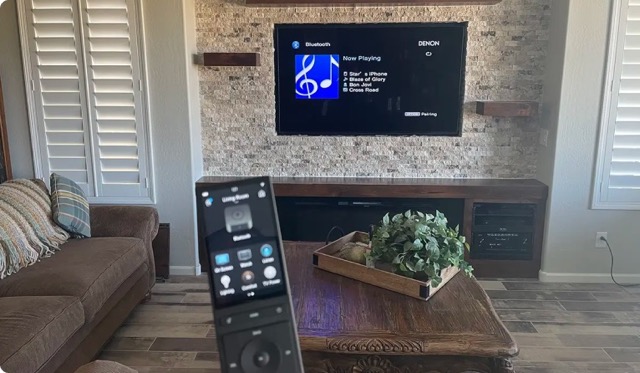
Understanding commercial AV installation Arizona is essential for making informed decisions. Audio/video technology in commercial spaces is no longer optional. Your conference room needs reliable video conferencing. Your restaurant needs background music that actually sounds good. Your lobby needs a display that communicates your brand. Your retail space needs signage that drives purchases.
This guide covers what commercial AV systems do, what they cost, and how to get the right system for your Arizona business without overspending or underbuilding.
commercial AV Arizona: Why Commercial AV Matters More Than Ever
Three trends are driving commercial AV investment in 2026:
commercial AV Arizona: Hybrid and Remote Work
Over 60% of companies with office space now support hybrid work. This means every meeting room needs video conferencing capability — not a laptop propped open on the table, but a purpose-built system with proper cameras, microphones, and displays.
A poorly equipped conference room wastes time (failed connections, inaudible audio, blurry video), frustrates remote participants, and makes your business look unprofessional. A properly installed system makes hybrid meetings seamless and productive.
Customer Experience
In retail, hospitality, and food service, AV technology directly affects revenue. Studies consistently show that:
- Background music increases dwell time by 15% to 30% in retail environments
- Digital menu boards increase average order value by 8% to 12% in restaurants
- Video walls in lobbies and showrooms increase perceived brand value and customer engagement
- Well-designed lighting and audio in restaurants directly affect tips and return visits
Operational Efficiency
Modern commercial AV systems do more than play content — they integrate with your business operations:
- Digital signage can display real-time data (production metrics, queue times, social media feeds)
- Room scheduling displays eliminate double-booking and conference room hunting
- Paging and distributed audio systems improve communication in warehouses, gyms, and large retail spaces
- Security cameras integrate with access control and POS systems for loss prevention
Commercial AV by Business Type
Commercial AV for Arizona Conference Rooms
This is the most common commercial AV project. Every office needs at least one well-equipped meeting space.
Small huddle room (2-6 people):
- 55″ to 65″ commercial display or interactive whiteboard
- USB conferencing camera (wide-angle, auto-framing)
- Ceiling microphone array or tabletop speakerphone
- Wireless presentation (BYOD) capability
- Cost: $3,000 to $8,000 installed
Medium conference room (6-14 people):
- 75″ to 86″ commercial display or dual-display setup
- PTZ (pan-tilt-zoom) camera with speaker tracking
- Ceiling microphone array (2-4 pods depending on table size)
- DSP (digital signal processor) for echo cancellation and noise reduction
- Wireless presentation + wired HDMI fallback
- Room scheduling panel outside the door
- Cost: $8,000 to $25,000 installed
Large boardroom or training room (14-30+ people):
- Dual 86″+ displays or LED video wall
- Multiple cameras for speaker tracking and room views
- Distributed ceiling microphone array (full room coverage)
- Advanced DSP with acoustic echo cancellation
- Control system (touch panel or tabletop controller)
- Motorized shades and lighting integration
- Cost: $25,000 to $75,000+ installed
Platform considerations: Most businesses standardize on Microsoft Teams or Zoom. Your AV system should be certified for your chosen platform (Teams Rooms, Zoom Rooms) for one-touch join capability and consistent user experience.
Restaurants and Bars
AV in food service directly affects the dining experience and repeat business.
Background music system:
- Distributed ceiling or pendant speakers zoned by area (dining room, bar, patio)
- Commercial music streaming service (Rockbot, Soundtrack Your Brand, Mood Media) — using personal Spotify in a commercial setting violates licensing terms
- Zone control so staff can adjust volume by area without affecting other zones
- Cost: $3,000 to $15,000 depending on square footage and zone count
Bar and sports viewing:
- Multiple commercial-grade displays (not consumer TVs — commercial displays are designed for 16+ hour daily use)
- Video distribution matrix to send any source to any screen
- Separate audio zones so one TV’s audio does not bleed into the dining room
- Cost: $8,000 to $30,000+ depending on number of displays
Digital menu boards:
- Commercial displays mounted in menu board position
- Content management system (CMS) for remote menu updates
- Brightness: 700+ nits for visibility in bright Arizona environments, especially if near windows
- Cost: $1,500 to $4,000 per screen installed, plus CMS subscription ($20-$80/month per screen)
Patio audio:
- Weather-rated speakers rated for Arizona’s extreme heat (130F+ surface temperatures on patios)
- Separate zone from interior for independent volume control
- Consider directional speakers to minimize noise complaints from neighboring businesses
- Cost: $2,000 to $6,000 for a typical restaurant patio
Retail Spaces
Retail AV drives foot traffic, increases dwell time, and lifts sales.
In-store music:
- Distributed audio with commercial licensing
- Zone control (fitting rooms quieter, floor louder)
- Cost: $2,000 to $8,000 depending on store size
Digital signage:
- Window-facing high-brightness displays (2,500+ nits) to remain visible in Arizona’s direct sunlight
- Interior product displays and promotional screens
- Content management for remote scheduling and updates
- Cost: $2,000 to $6,000 per display installed
Video walls:
- Seamless display panels (narrow bezel or direct-view LED) creating a large-format visual
- Common sizes: 2×2 (110″ diagonal) to 3×3 (165″ diagonal) or larger
- Content management and scheduling
- Cost: $15,000 to $60,000+ depending on technology and size
Hotels and Hospitality
Hospitality AV spans guest rooms, lobbies, event spaces, and back-of-house.
Lobby and common areas:
- Welcome displays, wayfinding signage, event boards
- Background music throughout public spaces
- Cost: $5,000 to $25,000 depending on scope
Event and meeting spaces:
- Flexible AV systems that accommodate different room configurations
- Portable or ceiling-mounted projectors, motorized screens, wireless microphones
- Distributed audio with zone control
- Cost: $15,000 to $50,000+ per room
Guest room technology:
- Smart TVs with casting capability (guests use their own streaming accounts)
- Automated lighting and climate (integrated with property management system)
- Cost: $500 to $2,000 per room
Office Common Areas
Beyond conference rooms, modern offices benefit from AV in shared spaces.
Lobby and reception:
- Brand display (video wall or large-format screen showing company content)
- Background music
- Visitor management integration
- Cost: $3,000 to $20,000
Break rooms and lounges:
- TV with streaming capability
- Background music
- Cost: $1,000 to $3,000
All-hands and town hall spaces:
- Large display or projector + screen
- Wireless microphone system
- Camera for hybrid participation
- Cost: $10,000 to $40,000
Technology Overview
Video Conferencing Systems
Modern video conferencing systems fall into two categories:
Appliance-based (Zoom Rooms, Microsoft Teams Rooms): A dedicated compute unit (Poly, Neat, Logitech, Crestron) runs the conferencing platform natively. Users walk in, tap “Join” on a touch panel, and the meeting starts. No laptop required. This is the standard for any room used for video calls more than twice per week.
BYOD (Bring Your Own Device): Users connect their laptop to the room’s display and audio system. Simpler and cheaper but relies on the user having the right cables, software, and settings. Best for huddle rooms and informal spaces.
Distributed Audio
Distributed audio sends music or announcements to speakers throughout a building from a centralized system. Key components:
- Source devices: Streaming players, microphone inputs, paging inputs
- DSP (digital signal processor): Routes audio, adjusts volume per zone, applies EQ, manages paging priorities
- Amplifiers: Power speakers across zones
- Speakers: Ceiling, pendant, surface-mount, or landscape (outdoor) depending on location
- Control: Wall panels, touchscreens, or mobile app for zone and source selection
Brands commonly used in commercial distributed audio: Sonance, QSC, Biamp, Crestron, AtlasIED.
Digital Signage
A digital signage system has three components:
- Display hardware: Commercial-grade screens rated for extended operation (16-24 hours/day). Consumer TVs used in commercial settings fail prematurely due to image retention, overheating, and warranty exclusions.
- Media player: A small compute device (BrightSign, Chrome OS, Windows) that drives the content on each display.
- Content management system (CMS): Cloud-based software for creating, scheduling, and deploying content across all screens. Popular platforms include BrightSign, Scala, Four Winds, and Navori.
- LCD video walls (narrow bezel): Individual LCD panels tiled together. Bezels of 0.88mm to 3.5mm create visible seam lines. Cost-effective for most applications. Brands: LG, Samsung, Planar.
- Direct-view LED: Modular LED panels with no visible seams. Higher cost but superior visual quality, especially for close-viewing distances. Brands: Samsung, LG, SNA Displays, Planar.
- Window-facing screens need 2,500+ nits of brightness to remain visible. Standard commercial displays at 500 nits wash out in direct Arizona sun.
- Projectors in rooms with windows require motorized blackout shades or high-lumen projectors (5,000+ lumens for medium rooms, 8,000+ for large rooms).
- Outdoor displays (restaurant patios, drive-through menu boards, gas station signage) need full-sunlight-rated screens and adequate cooling.
- AV equipment closets need dedicated cooling. A 100-square-foot AV closet can easily exceed 120 degrees Fahrenheit without ventilation or a mini-split.
- Outdoor-rated equipment enclosures with active cooling are required for any electronics exposed to exterior temperatures.
- Cable management matters: high temperatures accelerate insulation degradation on improperly rated cabling.
- Do you have experience with my type of business? A company that installs home theaters may not understand the requirements of a restaurant audio system or a corporate boardroom.
- Can you show me completed projects similar to mine? Ask for references and photos from comparable installations.
- Do you provide design documentation? A professional integrator provides system drawings, equipment lists, and rack elevation diagrams before installation begins.
- What brands do you carry and why? Avoid integrators who push a single brand regardless of application. The right brand depends on your needs.
- What does your warranty and service agreement cover? Understand what happens when something breaks after installation.
- Do you handle ongoing support and content management? Some integrators install and walk away. Others offer managed services for signage content updates, remote monitoring, and proactive maintenance.
Video Walls
Video walls are large-format displays made from multiple panels. Two main technologies:
Cost Ranges by Business Type
| Business Type | Typical Scope | Cost Range |
|---|---|---|
| Small office (1 conference room, lobby display) | Conferencing + signage | $5,000 – $15,000 |
| Mid-size office (3-5 conference rooms, common areas) | Full conferencing + distributed audio | $25,000 – $75,000 |
| Restaurant (music, patio, menu boards) | Distributed audio + signage | $8,000 – $30,000 |
| Bar / Sports bar (multiple TVs, music, patio) | Video distribution + audio | $15,000 – $50,000 |
| Retail store (music, signage) | Audio + digital signage | $5,000 – $20,000 |
| Retail flagship (video wall, full signage, audio) | Video wall + distributed systems | $30,000 – $100,000+ |
| Hotel (lobby, event space, guest rooms) | Comprehensive hospitality AV | $50,000 – $250,000+ |
| House of worship (audio, video, streaming) | PA + video + live streaming | $20,000 – $100,000+ |
| Fitness center / Gym (music, TVs, paging) | Distributed AV | $10,000 – $40,000 |
These ranges include equipment, installation labor, programming, and initial training. They do not include ongoing CMS subscriptions or service contracts.
Arizona-Specific Considerations for Commercial AV
Sun and Brightness
Arizona’s intense sunlight creates specific challenges for commercial displays:
Heat and Equipment Placement
Arizona summers push equipment temperatures to dangerous levels if not properly managed:
New Construction Timing
If you are building out a new commercial space in Arizona, involve your AV integrator during the design phase — not after the walls are up. Pre-wiring during construction saves 30% to 50% on labor costs and ensures conduit, power, and network drops are in the right locations.
How to Choose a Commercial AV Integrator
Not all AV companies are equal. Here are the questions that matter:
For a deeper dive on choosing an installer, see our guide: How to Choose an AV Installer: 10 Questions to Ask Before Hiring.
Get a Commercial AV Consultation
Trident Integration designs and installs commercial AV systems for businesses across the Phoenix metro area. From a single conference room to a multi-location rollout, we handle design, installation, programming, and ongoing support.
We work with restaurants, offices, retail spaces, hospitality properties, and houses of worship throughout Peoria, Scottsdale, Phoenix, Chandler, Gilbert, and the greater Arizona market. Every project starts with a free on-site consultation where we evaluate your space, understand your business needs, and provide a detailed proposal.
Call Trident Integration at (480) 658-0504 or schedule a free consultation online to get started on your commercial AV project.
For expert commercial av installation arizona services, trust the professionals at Trident Integration with over 20 years of experience.
Commercial AV in Arizona serves restaurants, corporate offices, hotels, and retail stores across the Phoenix metro area.
When planning commercial AV for your Arizona business, consider both current needs and future scalability.
Commercial AV Arizona businesses invest in creates better customer experiences, more productive meetings, and stronger brand presence.
The commercial AV Arizona market has grown rapidly as hybrid work and digital signage become standard business tools.
When budgeting for commercial AV Arizona, consider both upfront installation costs and long-term support and maintenance plans.
Trident Integration is a leading commercial AV Arizona provider with over 20 years of experience serving the Phoenix metro area.
For a free commercial AV Arizona assessment at your business, call (480) 658-0504 or visit our contact page.